西维蜀黍

【Distributed System】Replication

Why Replication

Replication means keeping a copy of the same data on multiple machines that are connected via a network. There are several reasons why you might want to replicate data:

  1. To keep data geographically close to your users (and thus reduce latency)
  2. To allow the system to continue working even if some of its parts have failed (and thus increase availability)
  3. To scale out the number of machines that can serve read queries (and thus increase read throughput)

What is Replication

Replication in computing can refer to:

Replication in space or in time is often linked to scheduling algorithms.

  ...


【Distributed System】Replication - Leader-based Replication

Leader-based Replication (Active/passive or Master–slave Replication)

Each node that stores a copy of the database is called a replica.

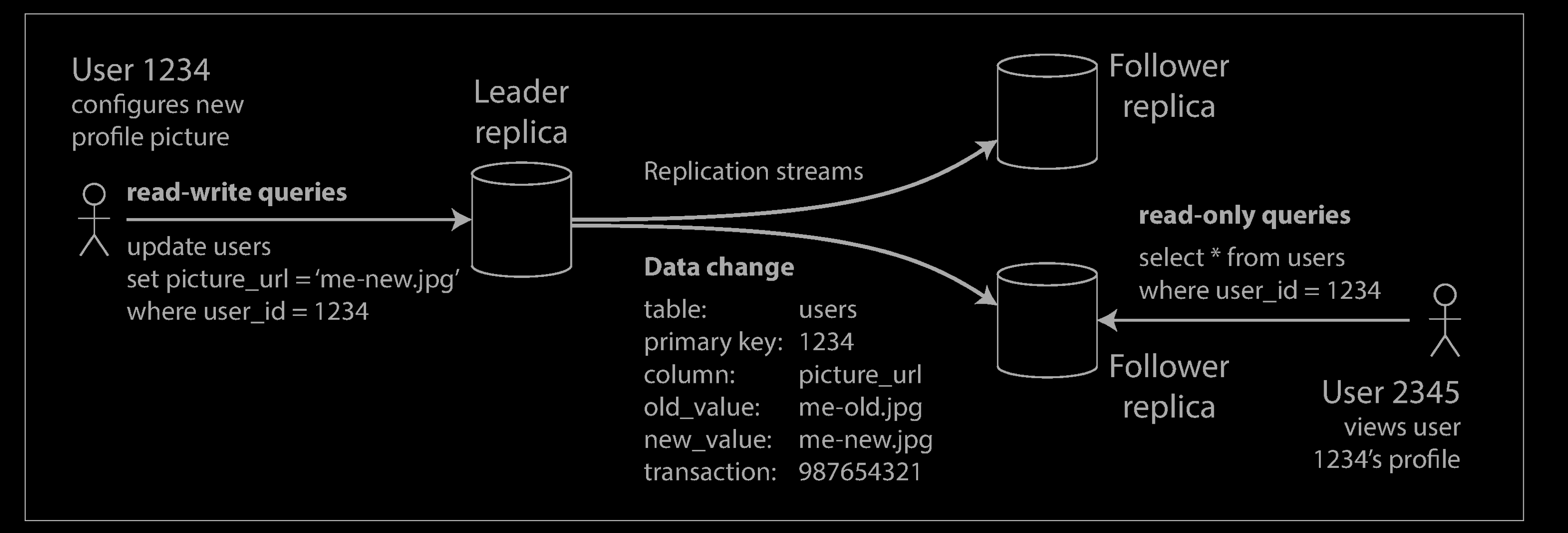
Every write to the database needs to be processed by every replica; otherwise, the replicas would no longer contain the same data. The most common solution for this is called leader-based replication (also known as active/passive or master–slave replication)

  1. One of the replicas is designated the leader (also known as master or primary). When clients want to write to the database, they must send their requests to the leader, which first writes the new data to its local storage.
  2. The other replicas are known as followers (read replicas, slaves, secondaries, or hot standbys). Whenever the leader writes new data to its local storage, it also sends the data change to all of its followers as part of a replication log or change stream. Each follower takes the log from the leader and updates its local copy of the database accordingly, by applying all writes in the same order as they were processed on the leader.
  3. When a client wants to read from the database, it can query either the leader or any of the followers. However, writes are only accepted on the leader (the followers are read-only from the client’s point of view).
  ...


【Distributed System】Data Flow

Dataflow Through Databases

  ...


【MySQL】常用 SQL 语句(Common SQL)- Display

显示DBs and Tables

mysql> show databases;
+----------------------------------+
| Database                         |
+----------------------------------+
| entry_task2_db                   |
| information_schema               |
| mysql                            |
| performance_schema               |
| sw_benchmark_test                |
| sw_benchmark_test_oltp_read_only |
| sw_test                          |
| sys                              |
+----------------------------------+

mysql> use sw_test;

mysql> SHOW TABLES;
+--------------------------------------------------+
| Tables_in_sw_test                                |
+--------------------------------------------------+
| logistic_promotion_seller_promo_budget_tab       |
| logistic_promotion_seller_promo_budget_usage_tab |
| logistic_promotion_seller_promo_channel_map_tab  |
| logistic_promotion_seller_promo_rule_map_tab     |
| logistic_promotion_seller_promo_tab              |
| seller_grouped_rule_budget_tab_00000004          |
| seller_grouped_rule_budget_usage_tab_00000005    |
| tb_person                                        |
| user                                             |
+--------------------------------------------------+
9 rows in set (0.00 sec)
  ...


【Engineering】How to Write Code

  ...


【Engineering】Logging

Log Levels

The log level is used to denote the severity of each event in the system. In most logging frameworks, the following levels are available.

  • FATAL: denotes very severe error events that will presumably lead the application to abort. Usually, these can end up in catastrophic failures.
  • ERROR: denotes error events that might still allow the application to continue running, with reduced capabilities in the affected paths.
  • WARN: denotes less-harmful events than errors. Usually, they do not lead to any degradation of capabilities or complete failure of the application. However, they are still red flags and must be investigated.
  • INFO: denotes the important event banners and informational messages in the application behaviour.
  • DEBUG: denotes specific and detailed information, mainly used for debugging purposes. These logs help us step through the code.
  • TRACE: denotes most low-level information like stack traces of code to provide the most information on a certain event/context. These logs help us inspect the variable values and full error stacks.
  ...


【MySQL】Automatic Rollback

  ...


【Lua】Lua Basic

Install

macOS

$ brew install lua
  ...


【macOS】制作 Ubuntu 启动 U 盘

创建 .dmg

我们知道DMG格式是Mac OS上常用的打包格式文件,需要把下载的Ubuntu安装文件(.iso)转换成(.dmg)格式的文件,方便在Mac OS上面进行操作,转换命令

 hdiutil convert -format UDRW -o ubuntu.iso ubuntu-20.04.3-desktop-amd64.iso

-format:为生成文件的权限,UDRW:表示转换成有read/write权限的镜像

$ diskutil list
...
/dev/disk5 (external, physical):
   #:                       TYPE NAME                    SIZE       IDENTIFIER
   0:     FDisk_partition_scheme                        *128.0 GB   disk5
   1:               Windows_NTFS                         128.0 GB   disk5s1

$ diskutil unmountDisk /dev/disk5
Unmount of all volumes on disk5 was successful

再次使用***diskutil*** 命令就不会再展示***/dev/disk4*** 了

  ...


【Engineering】Dataflow Model

  ...