西维蜀黍

【Linux】清除磁盘空间

Problem

But for some reason I kept getting 28: No space left on device when I run apt-get update. I tried to solve this by trying apt-get clean, which seemed to work for a little bit but then still had the same issue.

No space left on device” is a prompt that is generated when your disk space is completely filled. There is a chance of encountering this issue, even when the disk space isn’t really full. This might happen when your server’s disk space runs out of Inodes.

查看占用

查看当前物理disk占用情况

$ lsblk
NAME                      MAJ:MIN RM  SIZE RO TYPE MOUNTPOINT
loop0                       7:0    0 55.4M  1 loop /snap/core18/1944
loop1                       7:1    0 55.4M  1 loop /snap/core18/2128
loop2                       7:2    0 61.8M  1 loop /snap/core20/1081
loop3                       7:3    0 67.3M  1 loop /snap/lxd/21545
loop4                       7:4    0 70.3M  1 loop /snap/lxd/21029
loop5                       7:5    0 61.9M  1 loop /snap/core20/1169
loop6                       7:6    0 32.4M  1 loop /snap/snapd/13270
loop7                       7:7    0 32.3M  1 loop /snap/snapd/13170
sda                         8:0    0  200G  0 disk
|-sda1                      8:1    0  512M  0 part /boot/efi
|-sda2                      8:2    0    1G  0 part /boot
`-sda3                      8:3    0 48.5G  0 part
  `-ubuntu--vg-ubuntu--lv 253:0    0 34.3G  0 lvm  /

查看当前文件系统占用情况

$ df -h
Filesystem                         Size  Used Avail Use% Mounted on
udev                               1.9G     0  1.9G   0% /dev
tmpfs                              394M  996K  393M   1% /run
/dev/mapper/ubuntu--vg-ubuntu--lv   34G   24G  8.2G  75% /
tmpfs                              2.0G     0  2.0G   0% /dev/shm
tmpfs                              5.0M     0  5.0M   0% /run/lock
tmpfs                              2.0G     0  2.0G   0% /sys/fs/cgroup
/dev/sda2                          976M  300M  609M  34% /boot
/dev/loop0                          56M   56M     0 100% /snap/core18/1944
/dev/sda1                          511M  5.3M  506M   2% /boot/efi
/dev/loop1                          56M   56M     0 100% /snap/core18/2128
/dev/loop3                          68M   68M     0 100% /snap/lxd/21545
/dev/loop2                          62M   62M     0 100% /snap/core20/1081
/dev/loop4                          71M   71M     0 100% /snap/lxd/21029
/dev/loop5                          62M   62M     0 100% /snap/core20/1169
/dev/loop6                          33M   33M     0 100% /snap/snapd/13270
/dev/loop7                          33M   33M     0 100% /snap/snapd/13170
tmpfs                              394M  176K  394M   1% /run/user/1000

查看LVM卷组的信息

$ sudo vgdisplay
  --- Volume group ---
  VG Name               ubuntu-vg
  System ID
  Format                lvm2
  Metadata Areas        1
  Metadata Sequence No  3
  VG Access             read/write
  VG Status             resizable
  MAX LV                0
  Cur LV                1
  Open LV               1
  Max PV                0
  Cur PV                1
  Act PV                1
  VG Size               <48.50 GiB
  PE Size               4.00 MiB
  Total PE              12415
  Alloc PE / Size       8768 / 34.25 GiB
  Free  PE / Size       3647 / <14.25 GiB
  VG UUID               OWAYr3-DITL-hFT3-eyHu-Yf2t-nKsP-62GTHG

清理APT缓存

View Cache Space

$ sudo du -sh /var/cache/apt 

一旦决定清理apt缓存,清理命令如下:

$ sudo apt-get clean

apt clean 命令将删除保留在apt缓存中的所有软件包。 当然如果你本地网络并不快速,你也可以不用清理,避免安装软件时下载大量软件包耗费时间。

  ...


【Kafka】Config

broker 端配置

broker.id

每个 kafka broker 都有一个唯一的标识来表示,这个唯一的标识符即是 broker.id,它的默认值是 0。这个值在 kafka 集群中必须是唯一的,这个值可以任意设定,

port

如果使用配置样本来启动 kafka,它会监听 9092 端口。修改 port 配置参数可以把它设置成任意的端口。要注意,如果使用 1024 以下的端口,需要使用 root 权限启动 kakfa。

zookeeper.connect

用于保存 broker 元数据的 Zookeeper 地址是通过 zookeeper.connect 来指定的。比如我可以这么指定 localhost:2181 表示这个 Zookeeper 是运行在本地 2181 端口上的。我们也可以通过 比如我们可以通过 zk1:2181,zk2:2181,zk3:2181 来指定 zookeeper.connect 的多个参数值。该配置参数是用冒号分割的一组 hostname:port/path 列表,其含义如下

hostname 是 Zookeeper 服务器的机器名或者 ip 地址。

port 是 Zookeeper 客户端的端口号

/path 是可选择的 Zookeeper 路径,Kafka 路径是使用了 chroot 环境,如果不指定默认使用跟路径。

如果你有两套 Kafka 集群,假设分别叫它们 kafka1 和 kafka2,那么两套集群的zookeeper.connect参数可以这样指定:zk1:2181,zk2:2181,zk3:2181/kafka1zk1:2181,zk2:2181,zk3:2181/kafka2

log.dirs

Kafka 把所有的消息都保存到磁盘上,存放这些日志片段的目录是通过 log.dirs 来制定的,它是用一组逗号来分割的本地系统路径,log.dirs 是没有默认值的,你必须手动指定他的默认值。其实还有一个参数是 log.dir,如你所知,这个配置是没有 s 的,默认情况下只用配置 log.dirs 就好了,比如你可以通过 /home/kafka1,/home/kafka2,/home/kafka3 这样来配置这个参数的值。

  ...


【Golang】Use Kafka in Golang

  ...


【Kafka】安装

Install

macOS

$ brew install kafka

# install zookeeper
  ...


【RocketMQ】学习

Install

RocketMQ runs on all major operating systems and requires only a Java JDK version 8 or higher to be installed. To check, run java -version:

$ java -version
java version "1.8.0_121"

For Windows users, click here to download the 5.2.0 RocketMQ binary release, unpack it to your local disk, such as D:\rocketmq. For macOS and Linux users, execute following commands:

# Download release from the Apache mirror
$ wget https://dist.apache.org/repos/dist/release/rocketmq/5.2.0/rocketmq-all-5.2.0-bin-release.zip

# Unpack the release
$ unzip rocketmq-all-5.2.0-bin-release.zip

Prepare a terminal and change to the extracted bin directory:

$ cd rocketmq-all-5.2.0-bin-release/bin

1) Start NameServer

NameServer will be listening at 0.0.0.0:9876, make sure that the port is not used by others on the local machine, and then do as follows.

For macOS and Linux users:

### start Name Server
$ nohup sh mqnamesrv &

### check whether Name Server is successfully started
$ tail -f ~/logs/rocketmqlogs/namesrv.log
The Name Server boot success...

2) Start Broker

For macOS and Linux users:

### start Broker
$ nohup sh bin/mqbroker -n localhost:9876 &

### check whether Broker is successfully started, eg: Broker's IP is 192.168.1.2, Broker's name is broker-a
$ tail -f ~/logs/rocketmqlogs/broker.log
The broker[broker-a, 192.169.1.2:10911] boot success...
  ...


【Kafka】Basic

Components

Topic:Kafka将消息种子(Feed)分门别类, 每一类的消息称之为 Topic。

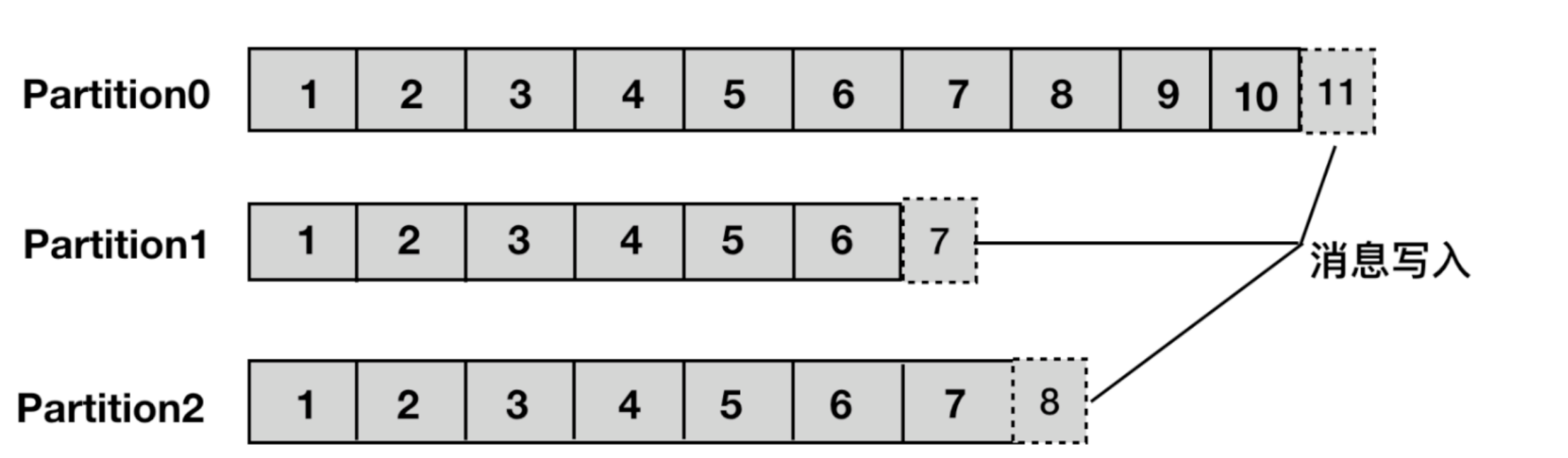
Partition: 一个 topic 可以被分为若干个分区(partition),同一个 topic 中的不同分区可以不在一个 broker上。即通过部署在多个 broker 上,来实现 kafka 的伸缩性,单一 topic 中的一个partition可以被保证有序,但是无法保证 topic 中所有的分区有序。

  • A topic could have multiple partitions.
  • Each partition is a single log file where records are written to it in an append-only fashion.
  • 一个非常大的 Topic 可以分布到多个 Broker 上,一个 Topic 可以分为多个 Partition 进行存储,每个 Partition 是一个有序的队列。
  • 一个broker可能同时是一个partition的leader,另一个partition的follower。 这样可以平衡负载,避免所有的请求都只让一台或者某几台服务器处理。
  • 每个partition有一个leader,零或多个follower。Leader处理此partition的所有的读写请求而follower被动的复制数据。如果leader当机,其它的一个follower会被推举为新的leader。

Producer: 发布消息的对象称之为 Topic Producer

Consumer: 订阅消息并处理发布的消息的种子的对象称之为 Topic Consumers

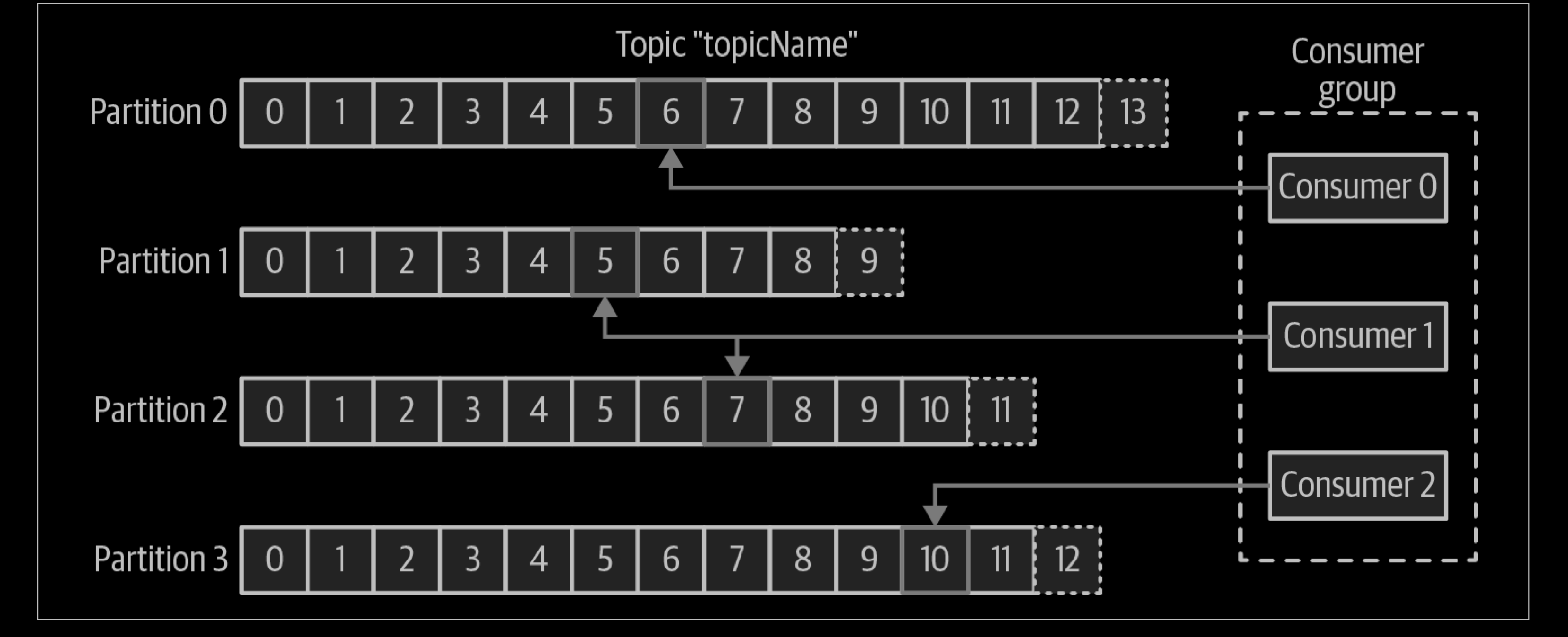
Consumer Group:生产者与消费者的关系就如同餐厅中的厨师和顾客之间的关系一样,一个厨师对应多个顾客,也就是一个生产者对应多个消费者,消费者群组(Consumer Group)指的就是由一个或多个消费者组成的群体。

  • 一个topic下的一条消息只会由一个消费者组中的一个消费者消费,而不会被这个消费者组中的其他消费者也同时消费
  • 处于不同消费者组的消费者可以同时消费同一个topic中的同一消息

Broker:已发布的消息保存在一组 Server中,这一组服务器被称为一个Kafka集群。集群中的每一个 Kafka Server都是一个 Broker。消费者可以订阅一个或多个 topic ,并从Broker拉数据,从而消费这些已发布的消息。

Rebalance:消费者组内某个消费者实例挂掉后,其他消费者实例自动重新分配订阅 topic 分区的过程。Rebalance 是 Kafka 消费者端实现高可用的重要手段。

Replica:Kafka 中消息的备份又叫做 副本(Replica),为实现数据备份的功能,保证集群中的某个节点发生故障时,该节点上的 Partition 数据不丢失,且 Kafka 仍然能够继续工作,为此Kafka提供了副本机制,一个 Topic 的每个 Partition 都有若干个副本,一个 Leader 副本和若干个 Follower 副本。

Leader: 每个partition有多个副本,其中有且仅有一个作为Leader,Leader是当前负责数据的读写的partition。

Follower: Follower跟随Leader,所有写请求都通过Leader路由,数据变更会广播给所有Follower,Follower与Leader保持数据同步。如果Leader失效,则从Follower中选举出一个新的Leader。当Follower与Leader挂掉、卡住或者同步太慢,leader会把这个follower从“in sync replicas”(ISR)列表中删除,重新创建一个Follower。

Consumer Offset: an integer value that continually increases—is another piece of metadata that Kafka adds to each message as it is produced.

  • Each message in a given partition has a unique offset, and the following message has a greater offset (though not necessarily monotonically greater).
  • By storing the next possible offset for each partition, typically in Kafka itself, a consumer can stop and restart without losing its place.

Offset:消费者消费的位置信息,监控数据消费到什么位置,当消费者挂掉再重新恢复的时候,可以从消费位置继续消费。

Kafka Controller Broker:其实就是一个 Kafka 集群中一台 Broker,它除了具有普通Broker 的消息发送、消费、同步功能之外,还需承担一些额外的工作。Kafka 使用公平竞选的方式来确定 Controller ,最先在 ZooKeeper 成功创建临时节点 /controller 的Broker会成为 Controller ,一般而言,Kafka集群中第一台启动的 Broker 会成为Controller,并将自身 Broker 编号等信息写入ZooKeeper临时节点/controller。

  ...


【Software Testing】Dryrun

Dry-run

A dry run (or a practice run) is a testing process where the effects of a possible failure are intentionally mitigated. For example, an aerospace company may conduct a “dry run” test of a jet’s new pilot ejection seat while the jet is parked on the ground, rather than while it is in flight.

The usage of “dry run” in acceptance procedures (for example in the so-called FAT = factory acceptance testing) is meant as following: the factory — which is a subcontractor — must perform a complete test of the system it has to deliver before the actual acceptance by customer.

  ...


【Golang】Reactor in Golang

  ...


【Golang】关键字 - select

Overall

The select statement provides another way to handle multiple channels.

It’s like a switch, but each case is a communication:

  • All channels are evaluated.
  • Selection blocks until one communication can proceed, which then does.
  • If multiple can proceed, select chooses pseudo-randomly.
  • A default clause, if present, executes immediately if no channel is ready.
    select {
    case v1 := <-c1:
        fmt.Printf("received %v from c1\n", v1)
    case v2 := <-c2:
        fmt.Printf("received %v from c2\n", v1)
    case c3 <- 23:
        fmt.Printf("sent %v to c3\n", 23)
    default:
        fmt.Printf("no one was ready to communicate\n")
    }
  ...


【Golang】设计模式 - Pipeline

Pipeline Pattern

Pipeline这种技术在可以很容易的把代码按单一职责的原则拆分成多个高内聚低耦合的小模块,然后可以很方便地(通过channel)拼装起来去完成比较复杂的功能。

Informally, a pipeline is a series of stages connected by channels, where each stage is a group of goroutines running the same function. In each stage, the goroutines

  • receive values from upstream via inbound channels
  • perform some function on that data, usually producing new values
  • send values downstream via outbound channels

Each stage has any number of inbound and outbound channels, except the first and last stages, which have only outbound or inbound channels, respectively. The first stage is sometimes called the source or producer; the last stage, the sink or consumer.

  ...