西维蜀黍

【Python】API - 时间表示

表示时间总共有 3 个相关的类

  • datetime.date:表示日期,Attributes: year, month, and day。
  • datetime.time:表示时间,Attributes: hour, minute, second, microsecond, and tzinfo。
  • datetime.dateime:表示日期和时间,Attributes: year, month, day, hour, minute, second, microsecond, and tzinfo。
  • datetime.timedelta:表示一个时间的差值
  ...


【MySQL】MySQL 8 + macOS 错误:Authentication plugin 'caching_sha2_password' cannot be loaded

错误信息

Authentication plugin ‘caching_sha2_password’ cannot be loaded: dlopen(/usr/local/mysql/lib/plugin/caching_sha2_password.so, 2): image not found

这是 MySQL 的问题,不是客户端问题,所以不管是用 Navicat Premium 还是 Sequel Pro 连接 MySQL,会碰到一样的错误。

解决方法

ALTER USER 'root'@'localhost' IDENTIFIED WITH mysql_native_password BY 'yourpassword';
  ...


【Python】I/O - 异步 I/O

asyncio

asyncio是Python 3.4版本引入的标准库,直接内置了对异步IO的支持。

asyncio的编程模型就是一个消息循环。我们从asyncio模块中直接获取一个EventLoop的引用,然后把需要执行的协程扔到EventLoop中执行,就实现了异步IO。

asyncio实现Hello world代码如下:

import asyncio

@asyncio.coroutine
def hello():
    print("Hello world!")
    # 异步调用asyncio.sleep(1):
    r = yield from asyncio.sleep(1)
    print("Hello again!")

# 获取EventLoop:
loop = asyncio.get_event_loop()
# 执行coroutine
loop.run_until_complete(hello())
loop.close()

@asyncio.coroutine把一个generator标记为coroutine类型,然后,我们就把这个coroutine扔到EventLoop中执行。

hello()会首先打印出Hello world!,然后,yield from语法可以让我们方便地调用另一个generator。由于asyncio.sleep()也是一个coroutine,所以线程不会等待asyncio.sleep(),而是直接中断并执行下一个消息循环。当asyncio.sleep()返回时,线程就可以从yield from拿到返回值(此处是None),然后接着执行下一行语句。

asyncio.sleep(1)看成是一个耗时1秒的IO操作,在此期间,主线程并未等待,而是去执行EventLoop中其他可以执行的coroutine了,因此可以实现并发执行。

我们用Task封装两个coroutine试试:

import threading
import asyncio

@asyncio.coroutine
def hello():
    print('Hello world! (%s)' % threading.currentThread())
    yield from asyncio.sleep(1)
    print('Hello again! (%s)' % threading.currentThread())

loop = asyncio.get_event_loop()
tasks = [hello(), hello()]
loop.run_until_complete(asyncio.wait(tasks))
loop.close()
  ...


【Python】线程 - ThreadLocal

ThreadLocal

import threading
    
# 创建全局ThreadLocal对象:
local_school = threading.local()

def process_student():
    # 获取当前线程关联的student:
    std = local_school.student
    print('Hello, %s (in %s)' % (std, threading.current_thread().name))

def process_thread(name):
    # 绑定ThreadLocal的student:
    local_school.student = name
    process_student()

t1 = threading.Thread(target= process_thread, args=('Alice',), name='Thread-A')
t2 = threading.Thread(target= process_thread, args=('Bob',), name='Thread-B')
t1.start()
t2.start()
t1.join()
t2.join()

执行结果:

Hello, Alice (in Thread-A)
Hello, Bob (in Thread-B)

全局变量local_school就是一个ThreadLocal对象,每个Thread对它都可以读写student属性,但互不影响。你可以把local_school看成全局变量,但每个属性如local_school.student都是线程的局部变量,可以任意读写而互不干扰,也不用管理锁的问题,ThreadLocal内部会处理。

可以理解为全局变量local_school是一个dict,不但可以用local_school.student,还可以绑定其他变量,如local_school.teacher等等。

ThreadLocal最常用的地方就是为每个线程绑定一个数据库连接,HTTP请求,用户身份信息等,这样一个线程的所有调用到的处理函数都可以非常方便地访问这些资源。

  ...


【Python】Basics - 类

  ...


【Python】线程 - 锁

Situation

在多进程中,同一个变量,各自有一份拷贝存在于每个进程中,互不影响。而在多线程中,变量可以被多个线程共享,所以,被共享的变量可以被任何一个线程修改,因此,线程之间的共享数据最大的危险在于多个线程可以同时对它进行修改。

来看看多个线程同时操作一个共享变量,最终因为多线程的交替执行(interleaving),导致数据不一致的情况:

import time, threading

# 假定这是你的银行存款:
balance = 0

def change_it(n):
    # 先存后取,结果应该为0:
    global balance
    balance = balance + n
    balance = balance - n

def run_thread(n):
    for i in range(100000):
        change_it(n)

t1 = threading.Thread(target=run_thread, args=(5,))
t2 = threading.Thread(target=run_thread, args=(8,))
t1.start()
t2.start()
t1.join()
t2.join()
print(balance)

我们定义了一个共享变量balance,初始值为0,并且启动两个线程,先存后取,理论上结果应该为0,但是,由于线程的调度是由操作系统决定的,当t1、t2交替执行时,只要循环次数足够多,balance的结果就不一定是0了。

原因是因为高级语言的一条语句在CPU执行时是若干条语句,即使一个简单的计算:

balance = balance + n

也分两步:

  1. 计算balance + n,存入临时变量中;
  2. 将临时变量的值赋给balance

也就是可以看成:

x = balance + n
balance = x

由于x是局部变量,两个线程各自都有自己的x,当代码正常执行时:

初始值 balance = 0

t1: x1 = balance + 5 # x1 = 0 + 5 = 5
t1: balance = x1     # balance = 5
t1: x1 = balance - 5 # x1 = 5 - 5 = 0
t1: balance = x1     # balance = 0

t2: x2 = balance + 8 # x2 = 0 + 8 = 8
t2: balance = x2     # balance = 8
t2: x2 = balance - 8 # x2 = 8 - 8 = 0
t2: balance = x2     # balance = 0
    
结果 balance = 0

但是t1和t2是交替运行的,如果操作系统以下面的顺序执行t1、t2:

初始值 balance = 0

t1: x1 = balance + 5  # x1 = 0 + 5 = 5

t2: x2 = balance + 8  # x2 = 0 + 8 = 8
t2: balance = x2      # balance = 8

t1: balance = x1      # balance = 5
t1: x1 = balance - 5  # x1 = 5 - 5 = 0
t1: balance = x1      # balance = 0

t2: x2 = balance - 8  # x2 = 0 - 8 = -8
t2: balance = x2   # balance = -8

结果 balance = -8

究其原因,是因为修改balance需要多条语句,而执行这几条语句时,线程可能中断,从而导致多个线程把同一个对象的内容改乱了。

两个线程同时一存一取,就可能导致余额不对,你肯定不希望你的银行存款莫名其妙地变成了负数,所以,我们必须确保一个线程在修改balance的时候,别的线程一定不能改。

  ...


【Python】线程 - 多线程(Multi-threading)

Python 多线程

Python中使用线程有两种方式:函数或者用类来包装线程对象。

创建新线程的办法

start_new_thread 函数 - 创建新线程

thread.start_new_thread ( function, args[, kwargs] )

参数说明:

  • function - 线程函数。
  • args - 传递给线程函数的参数,他必须是个tuple类型。
  • kwargs - 可选参数。
#!/usr/bin/python
# -*- coding: UTF-8 -*-
 
import thread
import time
 
# 为线程定义一个函数
def print_time( threadName, delay):
   count = 0
   while count < 5:
      time.sleep(delay)
      count += 1
      print "%s: %s" % ( threadName, time.ctime(time.time()) )
 
# 创建两个线程
try:
   thread.start_new_thread( print_time, ("Thread-1", 2, ) )
   thread.start_new_thread( print_time, ("Thread-2", 4, ) )
except:
   print "Error: unable to start thread"
 
while 1:
   pass

继承线程类 - 创建线程

Python 提供了Thread类来处理线程,Thread类提供了以下方法:

  • run(): 用以表示线程活动的方法。
  • start():启动线程活动。
  • join([time]) :等待至线程中止。这阻塞调用线程直至线程的join() 方法被调用中止-正常退出或者抛出未处理的异常-或者是可选的超时发生。
  • isAlive():返回线程是否活动的。
  • getName():返回线程名。
  • setName() :设置线程名。

使用Threading模块创建线程,直接从threading.Thread类继承,然后重写__init__方法和run方法:

#!/usr/bin/python
# -*- coding: UTF-8 -*-
 
import threading
import time
 
exitFlag = 0
 
class myThread (threading.Thread):   #继承父类threading.Thread
    def __init__(self, threadID, name, counter):
        threading.Thread.__init__(self)
        self.threadID = threadID
        self.name = name
        self.counter = counter
    def run(self):                   #把要执行的代码写到run函数里面 线程在创建后会直接运行run函数 
        print "Starting " + self.name
        print_time(self.name, self.counter, 5)
        print "Exiting " + self.name
 
def print_time(threadName, delay, counter):
    while counter:
        if exitFlag:
            (threading.Thread).exit()
        time.sleep(delay)
        print "%s: %s" % (threadName, time.ctime(time.time()))
        counter -= 1
 
# 创建新线程
thread1 = myThread(1, "Thread-1", 1)
thread2 = myThread(2, "Thread-2", 2)
 
# 开启线程
thread1.start()
thread2.start()
 
print "Exiting Main Thread"

或者,把一个函数传入并创建Thread实例,然后调用start()开始执行:

import time, threading

# 新线程执行的代码:
def loop():
    print('thread %s is running...' % threading.current_thread().name)
    n = 0
    while n < 5:
        n = n + 1
        print('thread %s >>> %s' % (threading.current_thread().name, n))
        time.sleep(1)
    print('thread %s ended.' % threading.current_thread().name)

print('thread %s is running...' % threading.current_thread().name)
t = threading.Thread(target=loop, name='LoopThread')
t.start()
t.join()
print('thread %s ended.' % threading.current_thread().name)
  ...


【Python】线程 - 多进程

Background

Unix/Linux操作系统提供了一个fork()系统调用,它非常特殊。

对普通函数的调用,调用一次,返回一次。

但是,调用fork()一次,返回两次,因为操作系统自动把当前进程(称为父进程)复制了一份(称为子进程),然后,分别在父进程和子进程内返回。

子进程永远返回0,而父进程返回子进程的ID。这样做的理由是,一个父进程可以fork出很多子进程,所以,父进程要记下每个子进程的ID,而子进程只需要调用getppid()就可以拿到父进程的ID。

Python的os模块封装了常见的系统调用,其中就包括fork,可以在Python程序中轻松创建子进程:

import os

print('Process (%s) start...' % os.getpid())
# Only works on Unix/Linux/Mac:
pid = os.fork()
if pid == 0:
    print('I am child process (%s) and my parent is %s.' % (os.getpid(), os.getppid()))
else:
    print('I (%s) just created a child process (%s).' % (os.getpid(), pid))

运行结果如下:

Process (876) start...
I (876) just created a child process (877).
I am child process (877) and my parent is 876.

由于Windows没有fork调用,上面的代码在Windows上无法运行。而Mac系统是基于BSD(Unix的一种)内核,所以,在Mac下运行是没有问题的,推荐大家用Mac学Python!

有了fork调用,一个进程在接到新任务时就可以复制出一个子进程来处理新任务,常见的Apache服务器就是由父进程监听端口,每当有新的http请求时,就fork出子进程来处理新的http请求。

  ...


【Engineering】Encode

ASCII is a simple form of Unicode text, but just one of many possible encodings and alphabets. Text from non-English-speaking sources may use very different letters, and may be encoded very differently when stored in files.

ASCII

ASCII, abbreviated from American Standard Code for Information Interchange, is a character encoding standard for electronic communication. ASCII codes represent text in computers, telecommunications equipment, and other devices. Most modern character-encoding schemes are based on ASCII, although they support many additional characters.

  ...


【Python】Basics - Simple Data Types - String

String

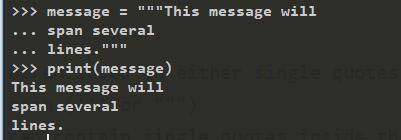
  • Strings in Python can be enclosed in either single quotes (’) or double quotes ("), or three of each (’’’ or “”")
  • Double quoted strings can contain single quotes inside them, as in "Bruce's beard"
  • and single quoted strings can have double quotes inside them, as in 'The knights who say "Ni!"'
  • triple quoted strings: strings enclosed with three occurrences of either quote symbol (either single or double quotes)

  • can even span multiple lines

  ...