西维蜀黍

【FreeBSD】Too Many Open Files

System Level

$ sysctl -a |grep files
kern.maxfiles: 780418
kern.maxfilesperproc: 702369
kern.openfiles: 627
p1003_1b.mapped_files: 200112
  ...


【Linux】命令 - ulimit

Demo

# Get the properties of all the user limits:
$ ulimit -a 

# Get hard limit for the number of simultaneously opened files:
$ ulimit -H -n

# Get soft limit for the number of simultaneously opened files:
$ ulimit -S -n

# Set max per-user process limit:
$ ulimit -u 30
  ...


【Linux】Too Many Open Files

System Level - FD Limits

file-max is the maximum file descriptors (FD) enforced on a kernel level, which cannot be surpassed by all processes.

Use the following command command to display maximum number of open file descriptors:

$ cat /proc/sys/fs/file-max
9223372036854775807
# or
$ sysctl fs.file-max
fs.file-max = 9223372036854775807

9223372036854775807 files normal user can have open in single login session.

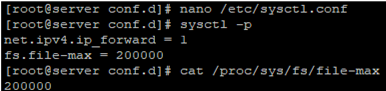
To change the general value for the system /proc/sys/fs/file-max, change the fs.file-max value in /etc/sysctl.conf:

$ fs.file-max = 100000

And apply it:

$ sysctl -p

  ...


【Linux】命令 - rsync

Install

macOS

$ brew install rsync

Ubuntu

$ sudo apt-get install rsync

Configuration of the rsync Daemon

The rsync daemon is an alternative to SSH for remote backups. Although more difficult to configure, it does provide some benefits. For example, using SSH to make a remote backup of an entire system requires that the SSH daemon allow root login, which is considered a security risk. Using the rsync daemon allows for root login via SSH to be disabled.

Edit the file /etc/default/rsync to start rsync as daemon using xinetd. The entry listed below, should be changed from false to inetd.

RSYNC_ENABLE=inetd

Install xinetd because it’s not installed by default.

$ sudo apt-get -y install xinetd

Create the file /etc/xinetd.d/rsync to launch rsync via xinetd. It should contain the following lines of text.

service rsync
{
    disable = no
    socket_type = stream
    wait = no
    user = root
    server = /usr/bin/rsync
    server_args = --daemon
    log_on_failure += USERID
    flags = IPv6
}

Create the file /etc/rsyncd.conf configuration for rsync in daemon mode. The file should contain the following. In the file, user should be replaced with the name of user on the remote machine being logged into.

max connections = 2
log file = /var/log/rsync.log
timeout = 300

[share]
comment = Public Share
path = /home/share
read only = no
list = yes
uid = nobody
gid = nogroup
auth users = user
  ...

【Engineering】Coupling

Coupling

In software engineering, coupling is the degree of interdependence between software modules; a measure of how closely connected two routines or modules are;[1] the strength of the relationships between modules.

Coupling and cohesion Coupling is usually contrasted with cohesion. Low coupling often correlates with high cohesion, and vice versa. Low coupling is often thought to be a sign of a well-structured computer system and a good design, and when combined with high cohesion, supports the general goals of high readability and maintainability.

  ...


【Linux】命令 - su

To confirm that the user is changed, use the whoami command:

$ whoami
# Switch to superuser (requires the root password):
$ su

# Switch to a given user (requires the user's password):
$ su username

# Switch to a given user and simulate a full login shell:
$ su - username

# Execute a command as another user:
$ su - username -c "command"
  ...


【Linux】命令 - smartctl

smartctl controls the Self-Monitoring, Analysis and Reporting Technology (SMART) system built into many ATA-3 and later ATA, IDE and SCSI-3 hard drives. The purpose of SMART is to monitor the reliability of the hard drive and predict drive failures, and to carry out different types of drive self-tests.

Install

Ubuntu

$ sudo apt-get install smartmontools
  ...


【Prometheus】Troubleshooting

Error on ingesting samples that are too old or are too far into the futur

  • Logs:
Jan  4 20:32:46 box prometheus: level=warn ts=2020-01-04T19:32:46.888Z caller=scrape.go:1170 component="scrape manager" scrape_pool=cpanel target=http://target_host:2089/metrics msg="Error on ingesting samples that are too old or are too far into the future" num_dropped=7
Jan  4 20:32:46 box prometheus: level=warn ts=2020-01-04T19:32:46.889Z caller=scrape.go:945 component="scrape manager" scrape_pool=cpanel target=http://target_host:2089/metrics msg="appending scrape report failed" err="out of bounds"
  ...


【Grafana】Grafana安装

安装

Ubuntu

$ sudo apt-get install -y apt-transport-https
$ sudo apt-get install -y software-properties-common wget
$ wget -q -O - https://packages.grafana.com/gpg.key | sudo apt-key add -

Add this repository for stable releases:

$ echo "deb https://packages.grafana.com/oss/deb stable main" | sudo tee -a /etc/apt/sources.list.d/grafana.list 

After you add the repository:

$ sudo apt-get update
$ sudo apt-get install grafana
  ...


【Prometheus】Prometheus 安装

安装 Prometheus Server

macOS

$ export VERSION=2.19.2
$ curl -LO  https://github.com/prometheus/prometheus/releases/download/v$VERSION/prometheus-$VERSION.darwin-amd64.tar.gz
$ tar -xzf prometheus-${VERSION}.darwin-amd64.tar.gz
$ cd prometheus-${VERSION}.darwin-amd64

Linux

$ curl -LO https://github.com/prometheus/prometheus/releases/download/v2.19.2/prometheus-2.19.2.linux-amd64.tar.gz
$ tar -xzf prometheus-2.19.2.linux-amd64.tar.gz
$ cd prometheus-2.19.2.linux-amd64/

Via Docker

# Run by background mode
$ docker run -d -p 9090:9090 prom/prometheus

# create the config file
$ mkdir prometheus_config; cd prometheus_config; touch prometheus.yml

# 如果希望设置为在宿主机开机后,这个 prometheus Docker instance 也一直运行
$ docker run -d \
--name prometheus \
-v /etc/localtime:/etc/localtime:ro \
-v /etc/timezone:/etc/timezone \
--restart unless-stopped \
-p 9090:9090 \
-v /home/sw/prometheus_config:/etc/prometheus \
prom/prometheus
  ...