西维蜀黍

【Golang】包加载(Package Initialization)

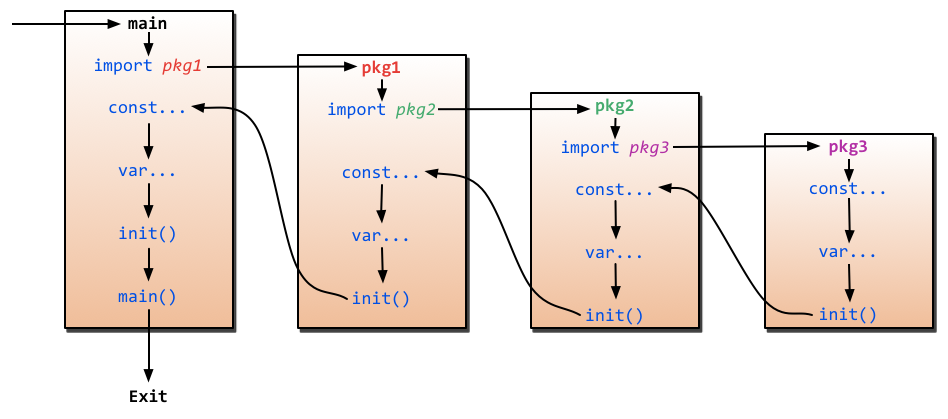
Package Initialization 包括两部分

  • 变量初始化
  • init() functions

变量初始化

  ...


【Golang】内置函数 - init()

init()

init() 函数的主要特点:

  • init() 函数先于 main函数自动执行,不能被其他函数调用;
  • init() 函数没有输入参数、返回值;
  • 一个包可以有多个 init() 函数,他们的执行顺序以每个文件作为单位,按照他们所在的文件的 lexical file name order
  • 一个包中的一个源文件可以有多个 init() 函数,这点比较特殊;
  • 同一个包的 init() 执行顺序,Golang没有明确定义,编程时要注意程序不要依赖这个执行顺序。
  • 不同包的 init() 函数按照包导入的依赖关系决定执行顺序。

  ...


【Linux】命令 - kill

kill

Sends a signal to a process, usually related to stopping the process.

All signals except for SIGKILL and SIGSTOP can be intercepted by the process to perform a clean exit.

  ...


【Linux】命令 - su/sudo

sudo(Superuser Do)

  • 功能: sudo 允许用户以另一个用户(通常是超级用户 root)的权限来执行单个命令。sudo 是一个临时授权工具,它不需要用户知道 root 的密码,而是使用当前用户的密码来进行身份验证。
  • 用途: sudo 主要用于执行需要管理员权限的单个命令。例如,系统管理员可以为特定用户授予使用 sudo 的权限,使他们能够在不直接访问 root 账户的情况下执行特定的管理任务。
  ...


【Linux】命令 - telnet

telnet

  ...


【Linux】操作 - 查看进程的 stdout

Approach 1 - readlink

  • 1: STROUT
  • 2: STRERR

文件描述符 1(STDOUT)/proc/[$PID]/fd/,内核将此文件表示为指向文件描述符(FD)重定向到的文件的符号链接。

$ readlink -f /proc/[pid]/fd/[index]
/tmp/file
  ...


【Linux】命令 - strace

strace

strace is a diagnostic, debugging and instructional userspace utility for Linux. It is used to monitor and tamper with interactions between processes and the Linux kernel, which include system calls, signal deliveries, and changes of process state. The operation of strace is made possible by the kernel feature known as ptrace.

在Linux世界,进程不能直接访问硬件设备,当进程需要访问硬件设备(比如读取磁盘文件,接收网络数据等等)时,必须由用户态模式切换至内核态模式,通过系统调用访问硬件设备。strace可以跟踪到一个进程产生的系统调用,包括参数,返回值,执行消耗的时间。

  ...


【Golang】打印调用栈信息

debug.Stack() - 打印当前 goroutine 的堆栈

package main

import (
	"fmt"
	"runtime/debug"
)

func test1() {
	test2()
}

func test2() {
	test3()
}

func test3() {
	fmt.Printf("%s", debug.Stack())
	//debug.PrintStack() // equivalent to the above
}

func main() {
	test1()
}
  ...


【Linux】Linux Distribution

Debian

Ubuntu - GNOME

Linux Mint

Pop!_OS - GNOME

ElementiryOS

  ...


【Linux】查看一个运行进程的环境变量

A quick mental dump in case I forget it again next time. First, check your PID:

$ ps faux | grep 'your_process'
508   28818  0.0  0.3  44704  3584 ?  Sl   10:10   0:00  \_ /path/to/your/script.sh

Now, using that PID (in this case, 28818), check the environment variables in /proc/$PID/environ.

$ cat /proc/28818/environ
TERM=linuxPATH=/sbin:/usr/sbin:/bin:/usr/binrunlevel=3RUNLEVEL=3SUPERVISOR_GROUP_NAME=xxxPWD=/path/to/your/homedirLANGSH_SOURCED=1LANG=en_US.UTF-8previous=NPREVLEVEL=N

Now to get that output more readable, you can do two things. Either parse the null character (\0) and replace them by new lines (\n) or use the strings tool that does this for you.

  ...