西维蜀黍

【Hackintosh】知识

ACPI

ACPI 是 Hewlett-Packard, Intel, Microsoft, Phoenix 和 Toshiba 共同制定的一个开放的行业规范。是 The Advanced Configuration and Power Interface 的缩写,也就是“电源管理模式和配置管理的接口规范”。从名字可以看出主要是“电源管理”和“配置管理”。是 BIOS 的一个高级功能模块。

它帮助操作系统合理控制和分配计算机硬件设备的电量,有 了ACPI,操作系统可以根据设备实际情况,根据需要把不同的硬件设备关闭。如Win7或者Win8系统,系统睡眠时,系统把当前信息储存在内存中,只保留内存等几个关键部件硬件的通电,使计算机处在高度节电状态。当然这只是它功能中的很少一部分。

它主要涵盖的功能包括:

  1. System power management(系统电源管理)
  2. Device power management(设备电源管理)
  3. Processor power management(处理器电源管理)
  4. Device and processor performance management(设备及处理器性能管理)
  5. Configuration / Plug and Play(配置/即插即用)
  6. System Events(系统事件)
  7. Battery management(电池管理)
  8. Thermal management(温度管理)
  9. Embedded Controller(嵌入式控制器)
  10. SMBus Controller(SMBus控制器)

在计算机应用平台,ACPI 越来越重要。ACPI由很多表组成,包括:RSDP,SDTH,RSDT,FADT,FACS,DSDTSSDT,MADT,SBST,XSDT,ECDT,SLIT,SRAT。其中DSDT就是它的一个重要的描述表。

  ...


【macOS】制作macOS Big Sur Beta 镜像

对于 Big Sur,目前只能在一个已经安装了macOS的OS上制作macOS镜像。

Download from macOS

Before you can install the new operating system, you must be enrolled in the Public Beta program. You can do this through Apple’s Public Beta program website. In the Get Started section of the website, click on the “enroll your Mac” link.

This should take you to the “Enroll you devices” webpage. Follow the instructions. In step 2, you will download the “macOS Public Beta Access Utility” which will enroll your Mac into the program. Then the utility will launch Software Update to download and install the Big Sur beta.

https://www.macworld.com/article/234359/how-to-install-the-macos-11-big-sur-public-beta.html

Then insatll macOS Big Sur Beta via System Update

Once finish, you would have this:

  ...


【Hackintosh】更新与维护

常用工具

  • hackintool
  • IORegistryExplorer
  • OpenCore Configurator

OS Setting

Issues

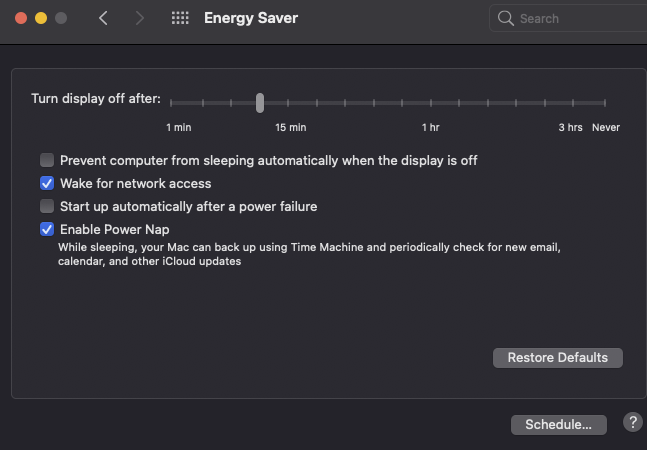
Power Management

Fixing Sleep

https://forum.amd-osx.com/index.php?threads/audiogods-gigabyte-aorus-x570-pro-pro-wifi-ultra-master-big-sur-opencore-0-7-1-efi.1344/post-10975

https://forum.amd-osx.com/index.php?resources/usbtoolbox.12/

选择系统icon更大

NVRAM - UIScale 设置为01

Debug

-boot-args 中加入 -v

boot-args

Here we get to set some variables that will help us with debug output, for us we’ll be using the following boot-args:

-v keepsyms=1 debug=0x12a msgbuf=1048576

踩坑

  • 如果在安装系统的时候,加了上面这些参数,可能会导致无限重启而无法进入安装系统界面,因此在安装系统时,仍然可以使用上面参数进行debug,但是如果发生无限重启时,需要把送上面参数去掉

Now lets go over what each arg does:

  • -v
    • Enables verbose output
  • keepsyms=1
    • Ensures symbols are kept during kernel panics, which are greatly helpful for troubleshooting
  • debug=0x12a
    • Combination of DB_PRT (0x2), DB_KPRT (0x8), DB_SLOG (0x20), and DB_LOG_PI_SCRN (0x100)
    • A full list of values for the latest version of XNU can be found here: debug.h(opens new window)
  • msgbuf=1048576
    • Sets the kernel’s message buffer size, this helps with getting proper logs during boot
    • 1048576 is 1MB(/1024^2), can be larger if required
    • Note not required with DebugEnhancer.kext, however for early kernel logs it’s still required

Ref

Update

Refer to https://dortania.github.io/OpenCore-Post-Install/universal/update.html#updating-opencore-and-macos

Update OpenCore

Note

  • So first, lets mount your hard drive’s EFI and make a copy somewhere safe with MountEFI (opens new window). We won’t be updating the drive’s EFI at first, instead we’ll be grabbing a spare USB to be our crash dummy. This allows us to keep a working copy of OpenCore in case our update goes south

  • For the USB, it must be formatted as GUID. Reason for this is that GUID will automatically create an EFI partition, though this will be hidden by default so you’ll need to mount it with MountEFI.

  • partition, though this will be hidden by default so you’ll need to mount it with MountEFI.

Now you can place your OpenCore EFI on the USB

Replace the OpenCore files with the ones you just downloaded

  • The important ones to update:
    • EFI/BOOT/BOOTx64.efi
    • EFI/OC/OpenCore.efi
    • EFI/OC/Drivers/OpenRuntime(Don’t forget this one, OpenCore will not boot with mismatched versions)
  • You can also update other drivers you have if present, these are just the ones that must be updated in order to boot correctly

Refer to https://dortania.github.io/OpenCore-Post-Install/universal/update.html#updating-opencore

Validate Config.plist

  • Use the OpenCore Utility ocvalidate: this tool will help ensure your config.plist is matching the OpenCore specification of the matching build.
# Enter your OpenCore folder
$ cd /Users/shiwei/Downloads/OpenCore-0.6.9-RELEASE
$ ./Utilities/ocvalidate/ocvalidate /Users/shiwei/Downloads/MyOpenCoreConfig/EFI/OC/Config.plist
  ...


【Golang】使用 - sync.RWMutex

package main

import (
	"sync"
)

// SafeCounter is safe to use concurrently.
type SafeCounter struct {
	mu sync.RWMutex
	v  map[string]int
}

// Inc increments the counter for the given key.
func (c *SafeCounter) Write(key string) {
	c.mu.Lock()
	// Lock so only one goroutine at a time can access the map c.v.
	c.v[key]++
	c.mu.Unlock()
}

// Value returns the current value of the counter for the given key.
func (c *SafeCounter) Read(key string) int {
	c.mu.RLock()
	defer c.mu.RUnlock()
	return c.v[key]
}

func main() {
	c := SafeCounter{v: make(map[string]int)}
	go func() {
		for {
			_ = c.Read("test")
		}
	}()
	go func() {
		for {
			c.Write("test")
		}
	}()
	select {}
}
  ...


【Design Pattern】Concurrency - Read Write Lock Pattern

Readers–writer Lock

In computer science, a readers–writer (single-writer lock, a multi-reader lock, a push lock, or an MRSW lock) is a synchronization primitive that solves one of the readers–writers problems.

An RW lock allows concurrent access for read-only operations, while write operations require exclusive access.

This means that multiple threads can read the data in parallel but an exclusive lock is needed for writing or modifying data. When a writer is writing the data, all other writers or readers will be blocked until the writer is finished writing. A common use might be to control access to a data structure in memory that cannot be updated atomically and is invalid (and should not be read by another thread) until the update is complete.

Readers–writer locks are usually constructed on top of mutexes and condition variables, or on top of semaphores.

  ...


【Golang】源码 - sync包 - Pool

sync.Pool

A Pool is a set of temporary objects that may be individually saved and retrieved.

Any item stored in the Pool may be removed automatically at any time without notification. If the Pool holds the only reference when this happens, the item might be deallocated.

A Pool is safe for use by multiple goroutines simultaneously.

Pool’s purpose is to cache allocated but unused items for later reuse, relieving pressure on the garbage collector. That is, it makes it easy to build efficient, thread-safe free lists. However, it is not suitable for all free lists.

An appropriate use of a Pool is to manage a group of temporary items silently shared among and potentially reused by concurrent independent clients of a package. Pool provides a way to amortize allocation overhead across many clients.

  ...


【Golang】使用 - sync.Pool

Why to use sync.Pool?

We want to keep the GC overhead as little as possible. Frequent allocation and recycling of memory will cause a heavy burden to GC. sync.Pool can cache objects that are not used temporarily and use them directly (without reallocation) when they are needed next time. This can potentially reduce the GC workload and improve the performance.

  ...


【Golang】性能调优 - via Prometheus

// NewGoCollector returns a collector that exports metrics about the current Go
// process. This includes memory stats. To collect those, runtime.ReadMemStats
// is called. This requires to “stop the world”, which usually only happens for
// garbage collection (GC). Take the following implications into account when
// deciding whether to use the Go collector:
//
//...
func NewGoCollector() Collector {
	return &goCollector{
		goroutinesDesc: NewDesc(
			"go_goroutines",
			"Number of goroutines that currently exist.",
			nil, nil),
		threadsDesc: NewDesc(
			"go_threads",
			"Number of OS threads created.",
			nil, nil),
		gcDesc: NewDesc(
			"go_gc_duration_seconds",
			"A summary of the pause duration of garbage collection cycles.",
			nil, nil),
		goInfoDesc: NewDesc(
			"go_info",
			"Information about the Go environment.",
			nil, Labels{"version": runtime.Version()}),
		msLast:    &runtime.MemStats{},
		msRead:    runtime.ReadMemStats,
		msMaxWait: time.Second,
		msMaxAge:  5 * time.Minute,
		msMetrics: memStatsMetrics{
			{
				desc: NewDesc(
					memstatNamespace("alloc_bytes"),
					"Number of bytes allocated and still in use.",
					nil, nil,
				),
				eval:    func(ms *runtime.MemStats) float64 { return float64(ms.Alloc) },
				valType: GaugeValue,
			}, {
				desc: NewDesc(
					memstatNamespace("alloc_bytes_total"),
					"Total number of bytes allocated, even if freed.",
					nil, nil,
				),
				eval:    func(ms *runtime.MemStats) float64 { return float64(ms.TotalAlloc) },
				valType: CounterValue,
			}, {
				desc: NewDesc(
					memstatNamespace("sys_bytes"),
					"Number of bytes obtained from system.",
					nil, nil,
				),
				eval:    func(ms *runtime.MemStats) float64 { return float64(ms.Sys) },
				valType: GaugeValue,
			}, {
				desc: NewDesc(
					memstatNamespace("lookups_total"),
					"Total number of pointer lookups.",
					nil, nil,
				),
				eval:    func(ms *runtime.MemStats) float64 { return float64(ms.Lookups) },
				valType: CounterValue,
			}, {
				desc: NewDesc(
					memstatNamespace("mallocs_total"),
					"Total number of mallocs.",
					nil, nil,
				),
				eval:    func(ms *runtime.MemStats) float64 { return float64(ms.Mallocs) },
				valType: CounterValue,
			}, {
				desc: NewDesc(
					memstatNamespace("frees_total"),
					"Total number of frees.",
					nil, nil,
				),
				eval:    func(ms *runtime.MemStats) float64 { return float64(ms.Frees) },
				valType: CounterValue,
			}, {
				desc: NewDesc(
					memstatNamespace("heap_alloc_bytes"),
					"Number of heap bytes allocated and still in use.",
					nil, nil,
				),
				eval:    func(ms *runtime.MemStats) float64 { return float64(ms.HeapAlloc) },
				valType: GaugeValue,
			}, {
				desc: NewDesc(
					memstatNamespace("heap_sys_bytes"),
					"Number of heap bytes obtained from system.",
					nil, nil,
				),
				eval:    func(ms *runtime.MemStats) float64 { return float64(ms.HeapSys) },
				valType: GaugeValue,
			}, {
				desc: NewDesc(
					memstatNamespace("heap_idle_bytes"),
					"Number of heap bytes waiting to be used.",
					nil, nil,
				),
				eval:    func(ms *runtime.MemStats) float64 { return float64(ms.HeapIdle) },
				valType: GaugeValue,
			}, {
				desc: NewDesc(
					memstatNamespace("heap_inuse_bytes"),
					"Number of heap bytes that are in use.",
					nil, nil,
				),
				eval:    func(ms *runtime.MemStats) float64 { return float64(ms.HeapInuse) },
				valType: GaugeValue,
			}, {
				desc: NewDesc(
					memstatNamespace("heap_released_bytes"),
					"Number of heap bytes released to OS.",
					nil, nil,
				),
				eval:    func(ms *runtime.MemStats) float64 { return float64(ms.HeapReleased) },
				valType: GaugeValue,
			}, {
				desc: NewDesc(
					memstatNamespace("heap_objects"),
					"Number of allocated objects.",
					nil, nil,
				),
				eval:    func(ms *runtime.MemStats) float64 { return float64(ms.HeapObjects) },
				valType: GaugeValue,
			}, {
				desc: NewDesc(
					memstatNamespace("stack_inuse_bytes"),
					"Number of bytes in use by the stack allocator.",
					nil, nil,
				),
				eval:    func(ms *runtime.MemStats) float64 { return float64(ms.StackInuse) },
				valType: GaugeValue,
			}, {
				desc: NewDesc(
					memstatNamespace("stack_sys_bytes"),
					"Number of bytes obtained from system for stack allocator.",
					nil, nil,
				),
				eval:    func(ms *runtime.MemStats) float64 { return float64(ms.StackSys) },
				valType: GaugeValue,
			}, {
				desc: NewDesc(
					memstatNamespace("mspan_inuse_bytes"),
					"Number of bytes in use by mspan structures.",
					nil, nil,
				),
				eval:    func(ms *runtime.MemStats) float64 { return float64(ms.MSpanInuse) },
				valType: GaugeValue,
			}, {
				desc: NewDesc(
					memstatNamespace("mspan_sys_bytes"),
					"Number of bytes used for mspan structures obtained from system.",
					nil, nil,
				),
				eval:    func(ms *runtime.MemStats) float64 { return float64(ms.MSpanSys) },
				valType: GaugeValue,
			}, {
				desc: NewDesc(
					memstatNamespace("mcache_inuse_bytes"),
					"Number of bytes in use by mcache structures.",
					nil, nil,
				),
				eval:    func(ms *runtime.MemStats) float64 { return float64(ms.MCacheInuse) },
				valType: GaugeValue,
			}, {
				desc: NewDesc(
					memstatNamespace("mcache_sys_bytes"),
					"Number of bytes used for mcache structures obtained from system.",
					nil, nil,
				),
				eval:    func(ms *runtime.MemStats) float64 { return float64(ms.MCacheSys) },
				valType: GaugeValue,
			}, {
				desc: NewDesc(
					memstatNamespace("buck_hash_sys_bytes"),
					"Number of bytes used by the profiling bucket hash table.",
					nil, nil,
				),
				eval:    func(ms *runtime.MemStats) float64 { return float64(ms.BuckHashSys) },
				valType: GaugeValue,
			}, {
				desc: NewDesc(
					memstatNamespace("gc_sys_bytes"),
					"Number of bytes used for garbage collection system metadata.",
					nil, nil,
				),
				eval:    func(ms *runtime.MemStats) float64 { return float64(ms.GCSys) },
				valType: GaugeValue,
			}, {
				desc: NewDesc(
					memstatNamespace("other_sys_bytes"),
					"Number of bytes used for other system allocations.",
					nil, nil,
				),
				eval:    func(ms *runtime.MemStats) float64 { return float64(ms.OtherSys) },
				valType: GaugeValue,
			}, {
				desc: NewDesc(
					memstatNamespace("next_gc_bytes"),
					"Number of heap bytes when next garbage collection will take place.",
					nil, nil,
				),
				eval:    func(ms *runtime.MemStats) float64 { return float64(ms.NextGC) },
				valType: GaugeValue,
			}, {
				desc: NewDesc(
					memstatNamespace("last_gc_time_seconds"),
					"Number of seconds since 1970 of last garbage collection.",
					nil, nil,
				),
				eval:    func(ms *runtime.MemStats) float64 { return float64(ms.LastGC) / 1e9 },
				valType: GaugeValue,
			}, {
				desc: NewDesc(
					memstatNamespace("gc_cpu_fraction"),
					"The fraction of this program's available CPU time used by the GC since the program started.",
					nil, nil,
				),
				eval:    func(ms *runtime.MemStats) float64 { return ms.GCCPUFraction },
				valType: GaugeValue,
			},
		},
	}
}
  ...


【Golang】性能调优 - GOGC

GOGC

The GOGC variable sets the initial garbage collection target percentage. A collection is triggered when the ratio of freshly allocated data to live data remaining after the previous collection reaches this percentage.

Default Value

The default is GOGC=100, which means garbage collection will not be triggered until the heap has grown by 100% since the previous collection. Effectively GOGC=100 (the default) means the garbage collector will run each time the live heap doubles.

  • Setting this value higher, say GOGC=200, will delay the start of a garbage collection cycle until the live heap has grown to 200% of the previous size.
  • Setting the value lower, say GOGC=20 will cause the garbage collector to be triggered more often as less new data can be allocated on the heap before triggering a collection.

Setting GOGC=off disables the garbage collector entirely. The runtime/debug package’s SetGCPercent function allows changing this percentage at run time. See https://golang.org/pkg/runtime/debug/#SetGCPercent.

  ...


【Golang】源码 - runtime 包

GOGC

The GOGC variable sets the initial garbage collection target percentage. A collection is triggered when the ratio of freshly allocated data to live data remaining after the previous collection reaches this percentage.

Default Value

The default is GOGC=100, which means garbage collection will not be triggered until the heap has grown by 100% since the previous collection. Effectively GOGC=100 (the default) means the garbage collector will run each time the live heap doubles.

  • Setting this value higher, say GOGC=200, will delay the start of a garbage collection cycle until the live heap has grown to 200% of the previous size.
  • Setting the value lower, say GOGC=20 will cause the garbage collector to be triggered more often as less new data can be allocated on the heap before triggering a collection.

Setting GOGC=off disables the garbage collector entirely. The runtime/debug package’s SetGCPercent function allows changing this percentage at run time. See https://golang.org/pkg/runtime/debug/#SetGCPercent.

	// NextGC is the target heap size of the next GC cycle.
	//
	// The garbage collector's goal is to keep HeapAlloc ≤ NextGC.
	// At the end of each GC cycle, the target for the next cycle
	// is computed based on the amount of reachable data and the
	// value of GOGC.
	NextGC uint64
  ...